How to Connect Your Business Systems: A Practical Integration Guide (2026)
The average UK business uses 12 different software tools to run day-to-day operations. Accounting in Xero, emails in Outlook, customer records in HubSpot, orders through Shopify, payments via Stripe. Each tool does its job well enough on its own. But when they don't talk to each other, your team ends up copying data between screens, chasing information that should be automatic, and spending hours on work that adds no real value.
Business system integration is the practice of connecting separate software applications so they share data automatically, eliminating manual data entry and creating seamless workflows across your entire operation. A 2025 MuleSoft survey found that 89% of IT leaders say integration challenges are directly slowing digital transformation. Yet the tools to fix this have never been more accessible or affordable, even for small businesses with no in-house developers.
What Is Business System Integration?
System integration means building automated connections between the software tools your business already uses. When a customer places an order on your website, integration means that order automatically appears in your accounting software, the stock levels update in your inventory system, the customer gets added to your CRM, and a confirmation email sends itself.
Without integration, someone on your team has to do every one of those steps manually. That's not just slow. It's error-prone. Research from Gartner estimates that poor data quality costs organisations an average of .9 million per year, with manual data re-entry being one of the top causes.
Why Are Disconnected Systems Costing You Money?
Most businesses don't set out to create a tangled mess of software. It happens gradually. You start with accounting software, add a website, get a CRM when sales grow, bolt on email marketing, then project management. Each tool was the right choice at the time. But nobody planned how they'd work together.
The Real Cost of Manual Workarounds
A 2025 Zapier report found that 76% of workers spend up to 3 hours daily on manual data transfer between apps. For a team of five, that's 75 hours a week of busywork. At an average UK salary, you're burning through roughly £35,000 a year just moving data from one screen to another.
Then there are the hidden costs: duplicate customer records, invoices that don't match orders, stock discrepancies, missed follow-ups. These aren't just annoyances. They're revenue leaks that compound over time.
How Do You Actually Connect Different Business Tools?
There are three main approaches, and the right one depends on your budget, technical ability, and how complex your needs are.
1. No-Code Integration Platforms (iPaaS)
Platforms like Zapier, Make (formerly Integromat), and n8n let you build connections between apps using a visual drag-and-drop interface. No coding required. You create 'workflows' or 'scenarios' that trigger automatically. For example: when a new order lands in Shopify, create an invoice in Xero and add the customer to HubSpot.
Zapier connects to over 7,000 apps and starts free. Make offers more complex multi-step workflows at a lower price point. n8n is open-source and self-hostable, giving you full control over your data. For most small and medium businesses, this approach covers 80-90% of integration needs.
2. Native Integrations and Marketplace Apps
Many popular tools have built-in integrations with each other. Xero has a marketplace of over 1,000 connected apps. HubSpot integrates natively with Gmail, Outlook, Slack, and Shopify. Shopify's app store has thousands of plugins that connect to accounting, shipping, and marketing tools.
Native integrations are usually the simplest to set up and the most reliable. The downside is they're limited to what the vendor has built. If you need a connection that doesn't exist natively, you'll need one of the other approaches.
3. Custom API Integration
For complex requirements, unique workflows, or when off-the-shelf solutions can't handle your specific business logic, custom integration through APIs gives you complete control. This is where an agency like Northern Codes comes in. We build bespoke connections between any tools using their APIs, creating workflows that match exactly how your business operates.
Custom integration makes sense when you need real-time synchronisation, complex data transformations, or connections between niche or industry-specific software that the no-code platforms don't support.
Which Integration Approach Is Right for You?
No-Code Platforms (Zapier, Make, n8n) - Best for: simple automations between popular apps. Cost: free to £50/month. Setup time: minutes to hours. Technical skill: none required. Limitation: complex logic or niche apps may not be supported.
Native Integrations (App Marketplaces) - Best for: standard connections between major platforms. Cost: often free or included. Setup time: minutes. Technical skill: none required. Limitation: only works with pre-built connections; limited customisation.
Custom API Integration (Built by a developer or agency) - Best for: complex workflows, real-time sync, niche software. Cost: from £500 upward depending on scope. Setup time: days to weeks. Technical skill: handled by the developer. Limitation: higher upfront cost, but most flexible and scalable.
What Are the Most Common Integration Use Cases?
Here are five real-world scenarios we build for clients regularly. Each one eliminates hours of manual work every week.
1. E-Commerce to Accounting (Shopify + Xero)
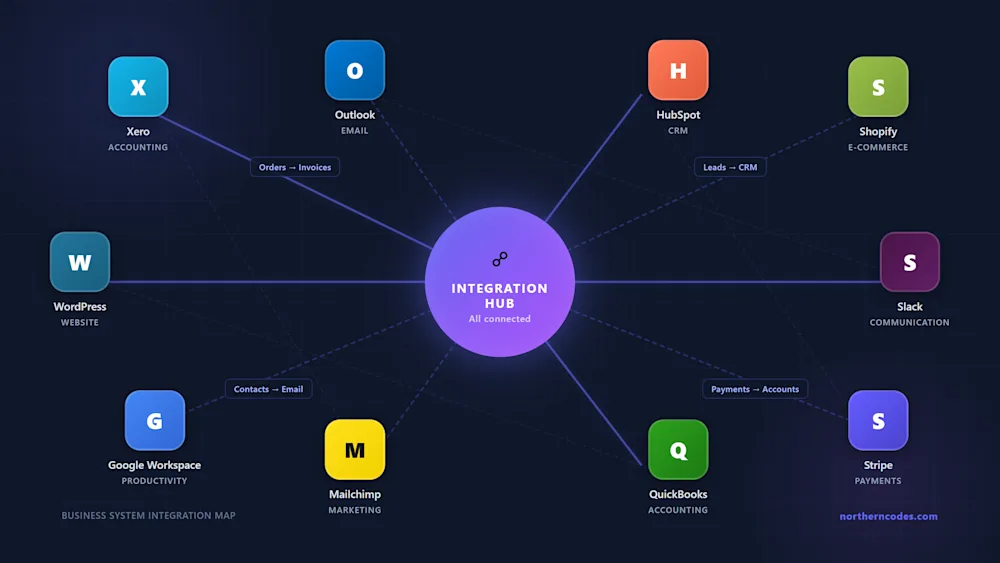
When a customer buys from your Shopify store, the order data flows straight into Xero as a sales invoice. Product details, tax, shipping, customer info - all mapped automatically. Refunds sync back too. No more end-of-day data dumps or reconciliation nightmares. For businesses processing 50+ orders a day, this alone saves roughly 10 hours of bookkeeping per week.
2. Website Leads to CRM (WordPress + HubSpot)
Every form submission on your website creates a new contact in HubSpot with the right tags, assigns it to the correct sales rep, and triggers a personalised welcome email sequence. No leads slip through the cracks. No one forgets to follow up. One of our clients saw their lead response time drop from 4 hours to under 3 minutes after we set this up.
3. CRM to Email Marketing (HubSpot + Mailchimp)
When a deal closes in HubSpot, the customer automatically moves to the right Mailchimp audience segment. They start receiving onboarding emails, product tips, or upsell campaigns without anyone lifting a finger. When contact details update in HubSpot, Mailchimp stays in sync. One source of truth, zero manual list management.
4. Payments to Notifications (Stripe + Slack + Xero)
Every Stripe payment triggers three things simultaneously: a Slack notification to your sales channel so the team celebrates wins in real time, an invoice in Xero for clean financial records, and an automated thank-you email to the customer. Failed payments trigger alerts to your support team so they can follow up before the customer churns.
5. Full Business Workflow (Website + CRM + Accounting + Email + Communication)
The real power comes from chaining integrations together. A prospect fills out your website form. HubSpot creates the contact and assigns a rep. The rep gets a Slack notification. When the deal closes, Stripe processes the payment. Xero generates the invoice. Mailchimp starts the onboarding sequence. Google Calendar books the kickoff meeting. Every step automatic, every system in sync.
How Does Northern Codes Build These Connections?
We specialise in connecting the tools businesses already use. No ripping out what works. No forcing you onto a single platform. Here's our typical approach:
Step 1: System Audit. We map every tool you're currently using, how data flows between them (or doesn't), and where the bottlenecks are. This usually reveals 3-5 manual processes that can be automated immediately.
Step 2: Integration Design. We design the workflows, choosing the right integration method for each connection. Sometimes it's a simple Zapier automation. Sometimes it's a custom API bridge. We pick what makes sense technically and commercially.
Step 3: Build and Test. We build the integrations, test them thoroughly with real data, and handle all the edge cases. What happens when a payment fails? When a customer updates their email? When two orders come in at the same millisecond? We account for all of it.
Step 4: Launch and Monitor. We go live, monitor everything for the first few weeks, and fine-tune as needed. Then we hand over clear documentation so your team understands exactly what's connected and how.
We've built integrations across accounting, e-commerce, CRM, email marketing, project management, communication, payment processing, and custom internal tools. If two systems have an API, we can connect them. Explore our AI automation services to see how we work.
How to Get Started This Week
Today
Write down every software tool your business uses. Email, accounting, CRM, website platform, project management, communication, payment processing. Note which ones you find yourself manually copying data between. That list is your integration roadmap.
This Week
Pick the one manual process that wastes the most time. Check if a native integration or a Zapier automation can handle it. Many of these can be set up in under an hour and start saving time immediately. The Xero App Marketplace and HubSpot integrations directory are good places to start.
This Month
If your needs go beyond simple point-to-point connections, or you want someone to design and build a complete integration architecture, get in touch with us for a free consultation. We'll audit your current setup and show you exactly where integration can save you time, money, and headaches.
FAQ: Connecting Business Systems
Q: Do I need to replace my existing software to integrate systems?
No. Integration works with the tools you already have. The whole point is to connect your existing software so it works together seamlessly. You don't need to migrate to a new platform or learn new tools.
Q: How much does business system integration cost?
Simple automations via Zapier or Make can be free or under £50/month. Custom integrations typically start from £500 depending on complexity. The ROI is usually obvious within weeks. If you're saving 10+ hours of manual work per week, the investment pays for itself quickly.
Q: Is my data safe when systems are connected?
Reputable integration platforms use encrypted connections (HTTPS/TLS) and follow data protection standards including GDPR. Custom integrations can be built with additional security layers. Your data passes between systems you already trust; the integration layer simply automates what your team currently does manually.
Q: What happens if one of my tools changes or I switch providers?
Good integration design accounts for this. No-code platforms let you swap connections in minutes. Custom integrations built with clean API architecture can be updated to point at a new tool without rebuilding everything. This is one reason we document every integration thoroughly.
Q: Can a small business with no technical staff benefit from integration?
Absolutely. In fact, small businesses often benefit the most because every hour saved matters more when you have a small team. No-code tools like Zapier require zero technical knowledge. For anything more complex, an agency like Northern Codes handles the technical side entirely.
The Bottom Line
UK businesses are wasting thousands of hours a year moving data between disconnected systems. The tools to fix this are mature, affordable, and accessible. Whether you connect two apps with a free Zapier automation or build a complete integration architecture with a specialist agency, the result is the same: less busywork, fewer errors, and a team that can focus on work that actually grows the business.
Northern Codes builds custom integrations between any business tools. If your team is drowning in manual data entry and disconnected software, book a free consultation and we'll show you what's possible. Or explore our services to see how we help UK businesses automate and integrate. You can also request a free quote to get a tailored plan for your specific setup.
Sources:
MuleSoft 2025 Connectivity Benchmark Report | Zapier - The State of Business Automation 2025 | Gartner - Data Quality Market Survey | Xero App Marketplace | HubSpot Integrations Directory | n8n - Open Source Workflow Automation