What is an ERP system? And do you need a new one?
Get the free business systems map
The worksheet from this guide as a printable PDF: list every system your business uses, count the hours people spend carrying information between them, then decide whether to buy, link or build. Subscribe to our automation briefing and it downloads instantly.
Free, no strings. We only email about automation that could pay for itself, and you can unsubscribe with one click.
In one sentence: An ERP system (short for enterprise resource planning, or in plain words, the main system your business runs on) keeps your orders, stock, customers, money and staff time in one place, so every part of the business works from the same set of numbers.
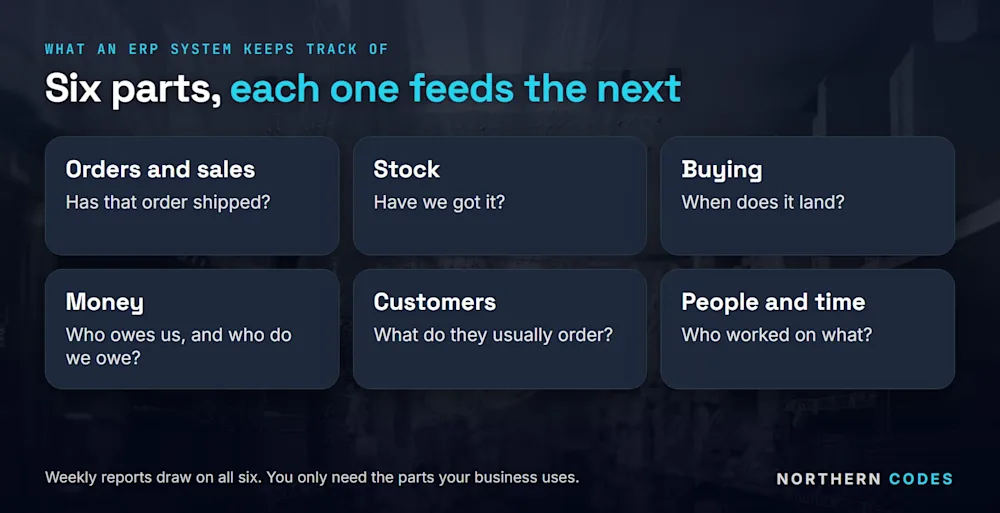
An order comes in on the website. Someone types it into the accounts. Someone else adds it to the stock spreadsheet. When the customer rings to ask where it is, a third person checks two systems before they can answer. Sooner or later, someone tells you the fix is "an ERP".
They may be right. But an ERP doesn't have to mean throwing out every system you own and starting again. This guide explains what an ERP system is in plain words, what goes in one, how it differs from customer records, and the three ways to get one. It's one of the jobs in our guide to what to automate first.
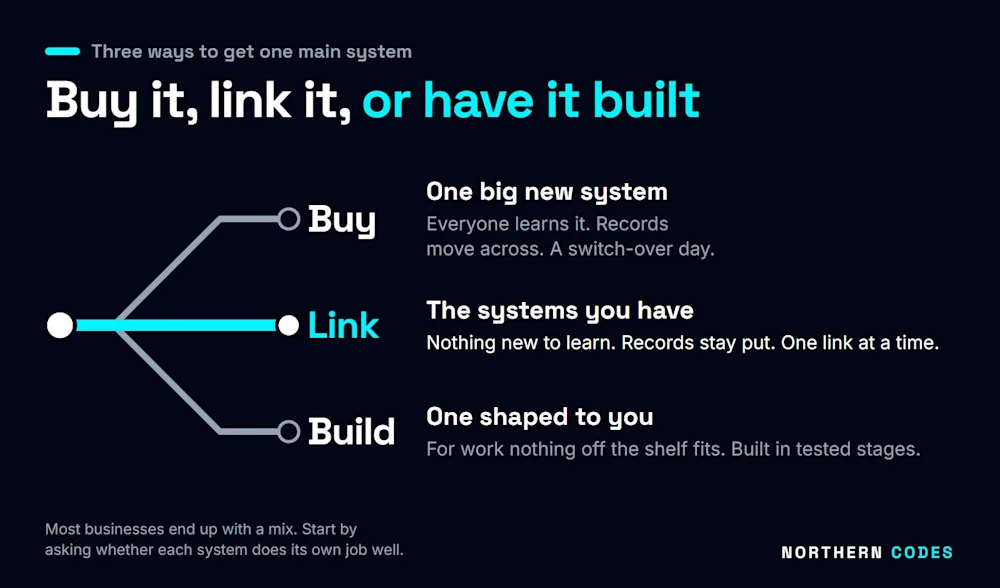
At a glance: three ways to get one main system
Buy one big new system | Link the systems you have | Have one built for you | |
|---|---|---|---|
What your team learns | A whole new system | Nothing new | One system, shaped to how you work |
What happens to your records | They all move across | They stay where they are | They move once |
How it arrives | A big switch-over day | One link at a time | In stages, each one tested |
Best when | Your old systems are failing anyway | Each system works, but none of them talk | Nothing off the shelf fits |
What is an ERP system, in plain words?
An ERP system is the main system a business runs on. It holds the information every team needs in one place. Orders, stock, invoices, customers, hours worked. When one person enters something, everyone else sees it straight away, so nobody has to type it in again.
Take a wholesaler. A customer orders 40 boxes. In a business with one main system, that single order takes the boxes off the stock count, makes the invoice, tells the accounts the money is due and shows up in Monday's sales figures. Nobody touches it after the order is typed.
In a business without one, each of those steps is a person copying the order from one place to another. That's slow. And every copy is a chance to get it wrong.
The name sounds bigger than the idea. Enterprise resource planning just means keeping track of everything the business has and does.
What does an ERP system do?
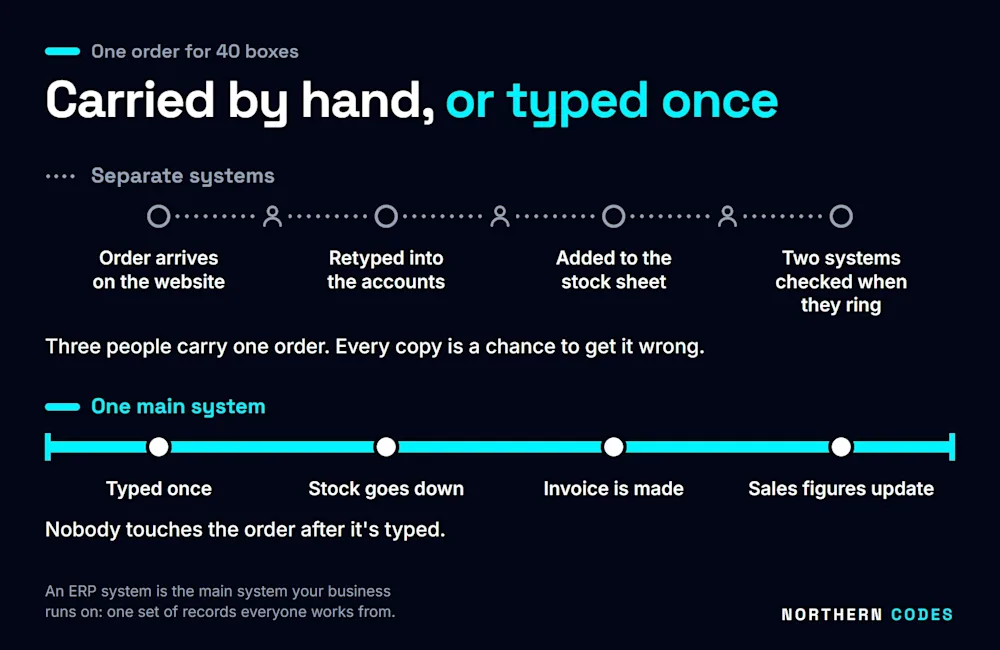
It keeps track of the parts of your business that depend on each other. Most systems cover the same handful of jobs. You only need the ones you use:
Part | What it keeps track of | The question it answers |
|---|---|---|
Orders and sales | What's been ordered, by whom, and whether it's gone | "Has that order shipped?" |
Stock | What's on the shelf and what's on the way | "Have we got it?" |
Buying | What you've ordered from suppliers | "When does it land?" |
Money | Invoices, payments, what's owed both ways | "Who owes us, and who do we owe?" |
Customers | Who buys, what they buy, what price they get | "What does this customer usually order?" |
People and time | Hours worked, jobs, rotas | "Who worked on what?" |
Reports | All of the above | "How are we doing this week?" |
Each part feeds the next. An order changes the stock. The stock changes what you buy. And all of it ends up in the money.
What is the difference between ERP and CRM?
A CRM (where you keep your customer records) looks after the customer: who they are, what you've said to them and what they might buy next. An ERP runs the whole business, from the order through the stock to the money. Some ERP systems include customer records. Many businesses keep them separate and link the two.
Think of it this way. Your customer records tell you the customer wants 40 boxes next month. The main system knows whether you've got 40 boxes, what they cost you and whether the customer has paid for the last lot.
If your customer records live in one place and your orders in another, the most useful thing is often to make those two talk. Then the person on the phone sees the whole picture without opening a second screen.
Do you need an ERP system?
You need one main set of information if your team spends time moving the same facts between systems. Whether that means buying a new system is a separate question. Start with the signs. If two or more of these sound like your business, the problem is real:
- You type the same order into two or three different places.
- The website says you've got it. The warehouse says you haven't.
- The month's numbers take a week or more to put together.
- Customers ring to ask where their order is, and you check two systems to tell them.
- One person knows how it all fits together, and when they're on holiday, things stop.
Count the places your information lives, and the people it takes to carry it between them. Those two numbers tell you more than the size of the business ever will.
What are the three ways to get one main system?
You can buy one new system and move everything into it, link the systems you already have so they work as one, or have a system built around how you work. Most businesses end up with a mix. The right choice depends on whether your current systems are any good at their own jobs.
Buy one big system and move into it
This is what most people picture when they hear "ERP". You choose a system and move your records across. You train everyone. Then you switch over on a set day.
It makes sense when your old systems are failing anyway, or you've outgrown them. It's also the biggest change of the three. Everyone learns something new at once, and the switch-over day is a risk you have to plan for weeks ahead. That's a lot to ask of a busy team.
Link the systems you already have
Here, each system keeps doing the job it's good at. Your accounts software stays where it is, and so do your online shop and your stock system. They just start talking to each other. An order typed once shows up everywhere it should, by itself.
This suits a business whose systems each work fine but don't talk to each other. Your team has nothing new to learn, and it arrives one link at a time, so the first link can be working long before the last one starts.
Have one built around how you work
Sometimes nothing off the shelf fits. The work is too particular, or the bought systems would force your team into a way of working that doesn't suit them. Then it's quicker to build the missing piece than to bend the business around a system.
One example from our own work: a UK hospitality staffing company had workers' timesheets arriving on paper. We built the piece that turns those timesheets into invoices by itself. That's 30 to 40 invoices a week, and about 22 hours a week back for the team. We wrote up how the invoicing works.
What does linking your systems look like in a real business?
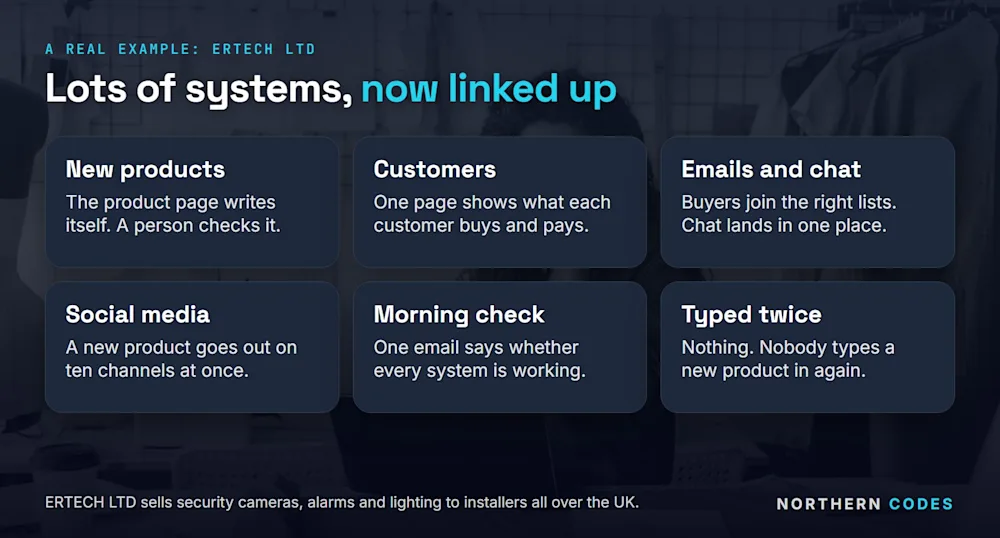
Here's a real one. ERTECH LTD sells security cameras, alarms and lighting to installers all over the UK. It used to run on lots of different systems that didn't talk to each other, so people typed the same things again and again. Now they're linked up:
- New products. The supplier sends the details, and the product page writes itself: the words, the price and the pictures. A person checks it and presses go.
- Customers. Every customer has one page that shows everything: what they buy, how much they spend, what price they get and what's in their basket right now.
- Emails and chat. People who buy go onto the right email lists by themselves. Messages from the website chat all land in one place.
- Social media. A new product goes out on ten social media channels at once.
- A morning check. Every morning, one email says whether all the systems are working.
Nobody there types a new product in twice. Nobody opens three systems to see what a customer buys.
Linking works for smaller jobs too. At Stomp Distribution, a motorbike and pit-bike distributor, when a customer emails "where's my order?", the answer goes back by itself with the tracking number once the order has shipped. Every Monday, a sales report makes itself and arrives by email. We've written about reports that build themselves too.
What does the law expect from your records?
UK law doesn't make you buy an ERP. But two sets of rules reward a business whose systems are linked, and both are easier when your information lives in one set of records.
VAT. If you're VAT-registered, HMRC's Making Tax Digital rules say the information that makes up your VAT return must move between your software by digital links. HMRC says copying and pasting between programs doesn't count, and neither does moving it by hand (HMRC VAT Notice 700/22, checked 08-10-2026). Linked systems already do that.
Customers' personal information. Under UK GDPR, anyone can ask what personal information you hold about them. Organisations usually have one month to answer (ICO, checked 08-10-2026). If a customer's details sit in five systems, someone has to search all five, by hand, against the clock. Linked up, the answer is in one place.
What does it cost, and how long does it take?
It depends on which way you choose. Be wary of anyone who quotes a price before they've seen how your work moves today. A bought system usually means a fee for every person who uses it plus the cost of setting it up and moving your records. Linking and building are priced by the job.
Time works the same way. A bought system needs a switch-over date, planned well ahead. Linking goes one link at a time, so the first link can be saving hours while the next one is still being planned.
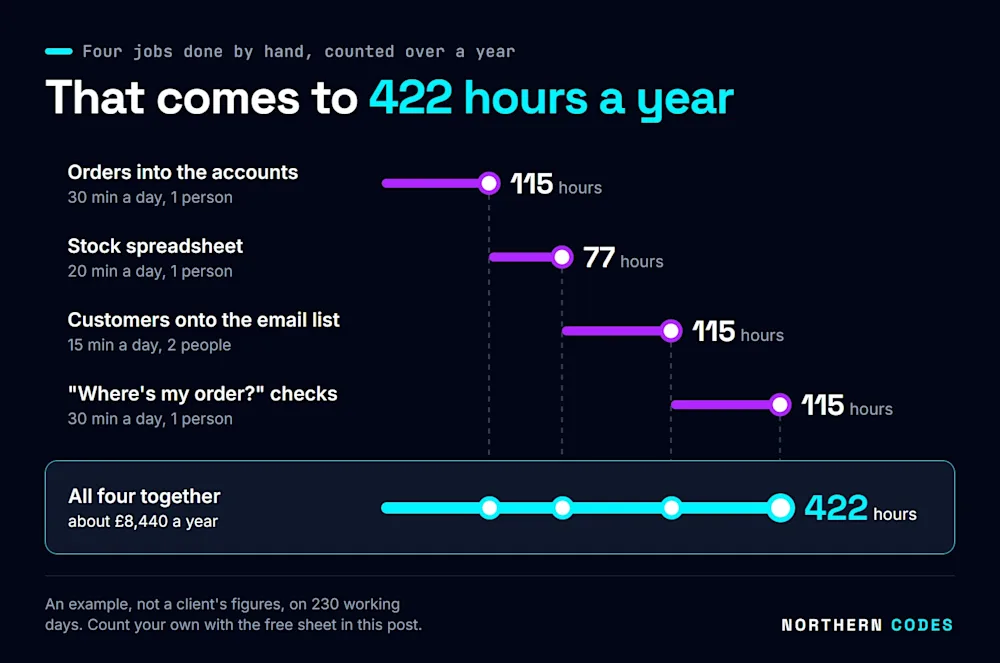
A better first question: what does the double typing cost you now? Here's an example of four everyday jobs in a business whose systems don't talk to each other, counted over a full year of working days:
Job done by hand | Time a day | People | Hours a year |
|---|---|---|---|
Typing orders into the accounts | 30 minutes | 1 | 115 |
Updating the stock spreadsheet | 20 minutes | 1 | 77 |
Adding new customers to the email list | 15 minutes | 2 | 115 |
Checking two systems for "where's my order?" | 30 minutes | 1 | 115 |
Total | 422 |
That's based on 230 working days a year. At £20 an hour in wages, 422 hours is about £8,440 a year, before you count the mistakes. It's an example, not a client's figures. Your own numbers will differ, and the free sheet in this post helps you count them.
How do you start?
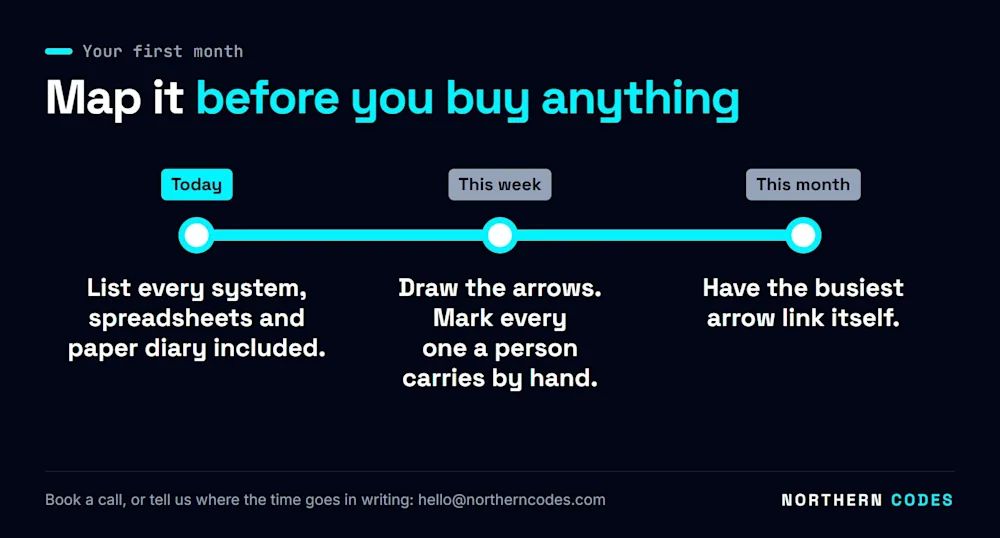
Map what you have before you buy anything. Three steps, over a month:
Today
List every system your business uses. Include the spreadsheets, the shared inbox and the paper diary on the front desk. They all hold information somebody needs.
This week
Draw an arrow wherever information moves from one system to another, and mark every arrow where a person carries it by hand. Note how long each one takes and how often.
This month
Pick the busiest arrow, the one that costs the most hours, and have it link itself. Check it against the old way for a few weeks. Once you trust it, move on to the next arrow. If you'd like to see where the numbers end up, our guide to business dashboards shows what one screen can tell you.
Tell us where the time goes
Book a call, or tell us where the time goes in writing. Either way, you get a plan and a fixed price.
Book a call or tell us in writing. You can also email hello@northerncodes.com.
If you'd like to see the rest of what a computer can take off your team, our AI automation agency page walks through it.
Common questions
What is an ERP system in simple terms?
It's the main system your business runs on. Orders, stock, money, customers and hours all live in one set of records, so when one person types something in, everyone else sees it and nobody types it again.
Do I have to replace my current systems to get an ERP?
No. If each system does its own job well, you can link them so they work as one. Nothing moves, and your team keeps using the screens it already knows.
Is an ERP the same as accounting software?
No. Your accounts software looks after the money. An ERP covers the money plus the orders, stock, customers and time that lead up to it. Many businesses keep their accounts software and link it to everything else.
Will my team need training?
If you link the systems you have, no. Everyone keeps using the systems they know, and the typing they used to do between them happens by itself. A brand new bought system does mean training for everyone.
How do I know which of the three ways is right for us?
Start with the free systems map in this post. If your systems work but don't talk, link them. If one is failing, replace that one. If nothing fits the way you work, have it built.
Will I know the price before you start?
Yes. You get a written plan and a fixed price before any work starts.
Sources: HMRC, VAT Notice 700/22: Making Tax Digital for VAT | ICO, Getting copies of your information (subject access request). Both checked 08-10-2026.
Get the free business systems map
The worksheet from this guide as a printable PDF: list every system your business uses, count the hours people spend carrying information between them, then decide whether to buy, link or build. Subscribe to our automation briefing and it downloads instantly.
Free, no strings. We only email about automation that could pay for itself, and you can unsubscribe with one click.